Church Settings
See and Manage Your Storage
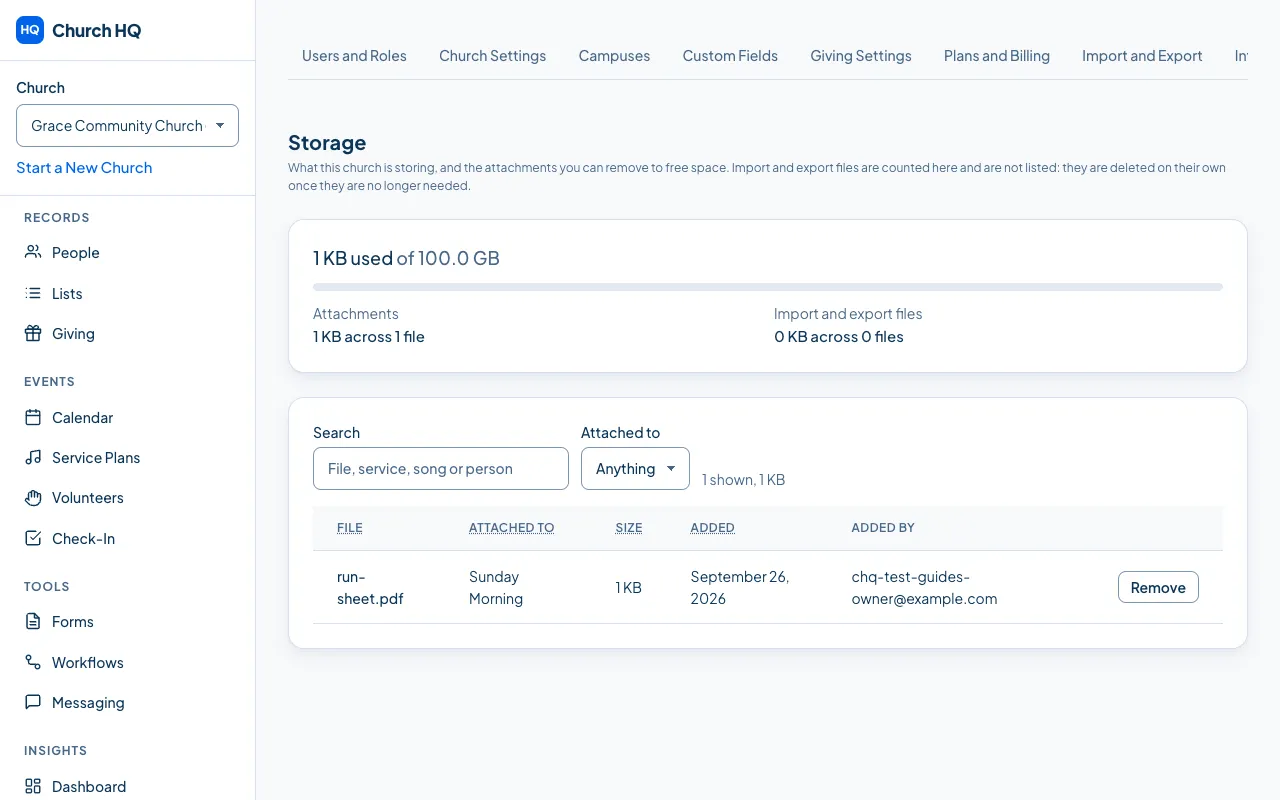
Every file your church keeps counts towards its storage: chord charts on a song, a run sheet on a service, and the import and export files Church HQ makes for you. The Storage tab shows how much of your allowance is used and lets you clear out what you no longer need.
- In the sidebar, choose Administration, then the Storage tab.
- The card at the top shows how much is used, out of what your plan allows, split into Attachments and Import and export files.
- To find something, use Search for a file, service, song or person’s name, or Attached to to narrow it to services or songs.
- Sort by File, Attached to, Size or Added by choosing the column heading. Sorting by Size largest first is the quickest way to find what is worth removing.
- To remove one, choose Remove on its row, then confirm.
What counts, and what clears itself
Section titled “What counts, and what clears itself”- Attachments are the files you upload yourself, on a service plan or in the song library. These are the ones you can remove here.
- Import and export files are counted, but not listed, because you do not have to manage them. An import file is removed as soon as the import is committed or rolled back, and after 30 days if it was started and never finished. An export is removed once it passes its retention.
What your plan allows
Section titled “What your plan allows”| Plan | Storage |
|---|---|
| Starter | 5 GB |
| Pro | 25 GB |
| Enterprise | Agreed with us when your church is set up |
The bar turns amber when you are close to the limit. Once you reach it, new attachments are refused until you free some space, and everything already stored stays exactly where it is. Nothing is ever deleted to make room, and Church HQ still makes your exports and keeps your records safe: it is only new attachments that wait.
Good to know
Section titled “Good to know”- Removing an attachment removes the file. It is gone from storage, not just hidden, which is the point of doing it here. The service or song it was attached to is untouched.
- One file can be up to 25 MB. Anything larger is refused when you try to upload it, with the size it actually was. For a long recording, link to where it already lives rather than storing a copy.
- Only Owners and Administrators can see this tab or remove anything from it.
- Church HQ counts what is stored, not what was uploaded. Removing an attachment frees its space straight away.
Still stuck? Contact the Help Desk at help@mychurchhq.com and tell us which guide you were following.