Church Settings
Change Your Church URL
Your church URL is the short name in every public link your church hands out: your giving page, your public forms, and the QR codes printed from them.
https://mychurchhq.com/give/your-church
You can change it, but think first. The old address stops working the moment you change it, and nobody, at your church or any other, can ever use it again.
Before you change it
Section titled “Before you change it”Make a list of everywhere the old address appears:
- your website’s giving button
- printed cards, bulletins, slides and banners
- QR codes on posters or in the foyer
- links in scheduled emails or on social media
You will need to update all of them.
- In the sidebar, choose Administration, then the Church Settings tab.
- Under Church URL, type the new short name. Church HQ tells you whether it is free.
- Read the warning and tick I understand that links and QR codes using the current address will stop working.
- Choose Change church URL.
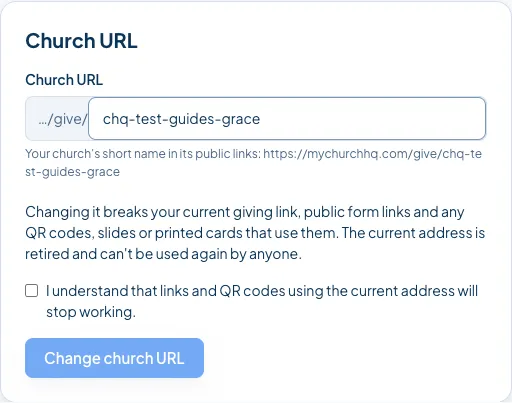
Your public links use the new address straight away.
Good to know
Section titled “Good to know”- Old addresses are retired for good, so nobody else can pick up your old links later. That is deliberate: it stops someone else receiving donations meant for you.
- Only Owners and Administrators can change it.
- Your church’s name is separate. Changing the URL does not change the name people see.
Still stuck? Contact the Help Desk at help@mychurchhq.com and tell us which guide you were following.